Description
Play Clouds + Sheep, SliceIt! and 450,000+ other Android apps on your Windows PC!
REQUIRES: BlueStacks App Player for PC - go to BlueStacks.com to download.
★ CES Best Software 2012 Award Winner - Best App Ever Award 2012 ★
"Push" apps from your phone onto your PC easily and remotely. Then use them in windowed or fullscreen mode. Over a million downloads of App Player for PC so far. BlueStacks is free while in beta - let us know your feedback!
★ NEW: Choose windowed mode or maximize to fullscreen (in BlueStacks on PC)
★ NEW: Far more apps work in BlueStacks than did in our alpha version!
Here are some apps that are great to use with BlueStacks:
GAMES: Play Where's My Water?, Angry Birds, Words With Friends and hundreds of thousands of others
MESSAGING: Use WhatsApp, KakaoTalk and others to message with friends from your desktop
KIDS: Let your kids expand their minds on the big screen with educational apps and e-books like The Lorax
PHOTOS: Instant PC photo-editing and sharing software using apps like Skitch and PicSay
MUSIC: Use media players like the WinAmp app to play files from your PC
SOCIAL: Use apps like Facebook and Twitter to get a streamlined experience
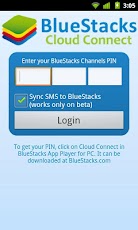
Remember, you must download BlueStacks App Player for Windows from BlueStacks.com to your PC in order to use BlueStacks Cloud Connect.
Happy syncing!
REQUIRES: BlueStacks App Player for PC - go to BlueStacks.com to download.
★ CES Best Software 2012 Award Winner - Best App Ever Award 2012 ★
"Push" apps from your phone onto your PC easily and remotely. Then use them in windowed or fullscreen mode. Over a million downloads of App Player for PC so far. BlueStacks is free while in beta - let us know your feedback!
★ NEW: Choose windowed mode or maximize to fullscreen (in BlueStacks on PC)
★ NEW: Far more apps work in BlueStacks than did in our alpha version!
Here are some apps that are great to use with BlueStacks:
GAMES: Play Where's My Water?, Angry Birds, Words With Friends and hundreds of thousands of others
MESSAGING: Use WhatsApp, KakaoTalk and others to message with friends from your desktop
KIDS: Let your kids expand their minds on the big screen with educational apps and e-books like The Lorax
PHOTOS: Instant PC photo-editing and sharing software using apps like Skitch and PicSay
MUSIC: Use media players like the WinAmp app to play files from your PC
SOCIAL: Use apps like Facebook and Twitter to get a streamlined experience
Remember, you must download BlueStacks App Player for Windows from BlueStacks.com to your PC in order to use BlueStacks Cloud Connect.
Happy syncing!
App Screenshots



No comments:
Post a Comment